Display
The display on LoRa APRS Digi/iGate is intentionally kept simple. It shows a persistent status screen with essential information about your station, and occasionally displays temporary messages for specific events. This design philosophy aligns with the firmware’s focus on speed and reliability over fancy visuals.
There is little reason to invest development effort into fancy display features. In practice, a Digi/iGate station needs to be installed close to the antenna for optimal RF performance - typically on a rooftop, in an attic, or mounted on a mast. Nobody is going to stand there staring at a tiny 0.96” or 1.3” OLED screen. It’s simply impractical.
If you want to monitor what your station is doing, there are much better options:
- Syslog - Stream detailed packet logs to a remote server for analysis.
- Web Configuration Panel - Access real-time status and configuration through your browser.
- APRS TNC Web - A dedicated web interface for monitoring APRS traffic.
These tools provide far more information and are accessible from anywhere on your network, making them a practical choice for station monitoring.
This is what the display looks like after flashing the firmware. Note that the firmware starts listening for RF packets immediately after boot, so you may see a received station right away if there is any activity on the frequency.
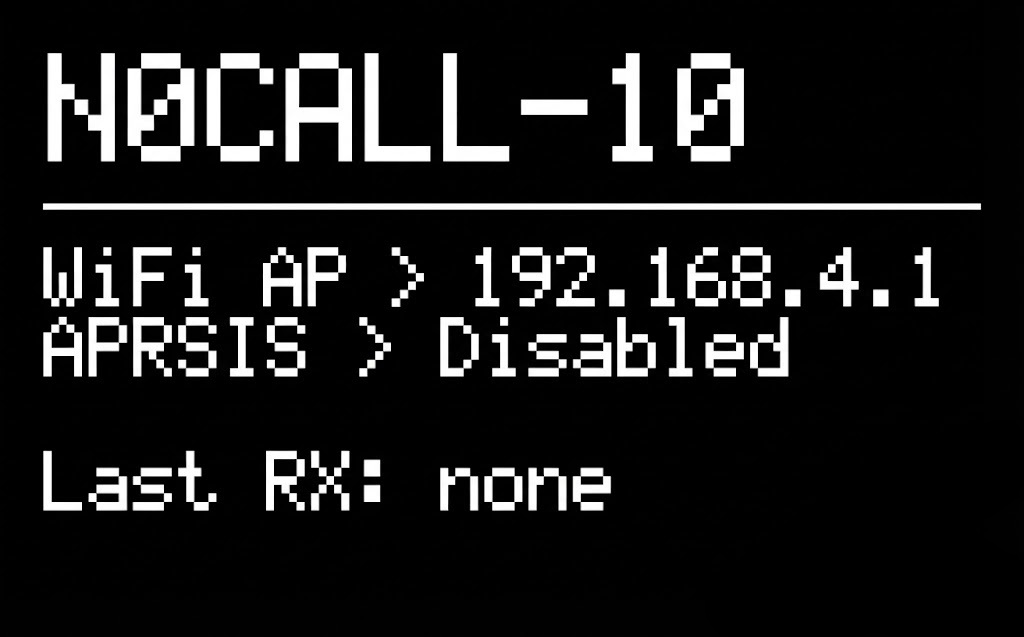
Persistent Screen
The main screen is always visible and displays the following information from top to bottom:
-
Your Callsign + SSID
- Displays your configured station callsign with its SSID.
-
WiFi Status
- Shows the current WiFi connection status. Possible messages:
WiFi disabled- WiFi is turned off in the configuration.WiFi connecting...- The device is attempting to connect to the configured network.WiFi< [IP address]- Successfully connected, showing the assigned IP address.WiFi AP > 192.168.4.1- Running in Access Point mode, connect to this IP to configure.WiFi AP starting..- Access Point mode is being initialized.WiFi reconnect...- Connection was lost, attempting to reconnect.
- Shows the current WiFi connection status. Possible messages:
-
APRS-IS Status
- Shows the current APRS-IS connection and authentication status. Possible messages:
APRSIS > Disabled- APRS-IS functionality is turned off in the configuration.APRSIS > Verified- Connected and authenticated successfully. Everything is working correctly.APRSIS > Unverified- Connected but authentication failed. This means your passcode is incorrect.APRSIS > Connected- Connected to the server, currently performing authentication.APRSIS < Connecting..- Attempting to establish a connection to the APRS-IS server.
- Shows the current APRS-IS connection and authentication status. Possible messages:
-
Power Information (optional)
- If available, displays battery voltage and/or external voltage readings.
- This section only appears on devices with power monitoring capabilities.
-
Last Received Station
- Shows the callsign of the last station heard over RF.
- Displays
noneif no station has been received yet. - Important: This only shows stations received via RF, not stations from APRS-IS.
-
RSSI and SNR
- Shows the signal strength (RSSI) and Signal-to-Noise Ratio (SNR) of the last received RF packet.
- This line remains empty if no station has been received yet (when “Last Received Station” shows
none).
Temporary Messages
During operation, the display will briefly show temporary messages for various events. These messages appear for a short time and then the screen returns to the persistent view.
These temporary messages do not introduce any additional delay to the firmware’s operation. Some messages may appear very briefly - sometimes just a flash - and this is intentional. The display must never slow down packet processing. Diagnostic and important messages are displayed longer to ensure you have time to notice them, while routine informational messages are shown only as long as the operation naturally takes.
Informational Messages
These messages inform you about normal operational events:
-
APRSIS to RF- Displayed when a packet from APRS-IS is being transmitted over RF.
-
Status TX to APRSISorStatus TX to RF- Shown when a status packet is being transmitted.
- The destination depends on whether the station has an active APRS-IS connection.
-
Beacon TX to RF/Beacon TX to APRSIS/Beacon TX to RF to APRSIS- Displayed when your station beacon is being transmitted.
- The message varies based on your configuration and available connections.
-
Digi TX- Shown when the station is repeating (digipeating) a packet.
-
OTA Update Local- Displayed during a local firmware update (uploading a
.binfile via the web interface).
- Displayed during a local firmware update (uploading a
-
OTA Update --% Remote- Shown during a remote firmware update, including the download progress percentage.
-
TX Initial Telemetry 1/3…TX Initial Telemetry 3/3- Displayed when the station is sending its initial telemetry configuration packets after boot.
-
Configuration Saved- Shown when configuration changes have been saved.
-
Rebooting- Displayed just before the device restarts.
Diagnostic Messages
These messages indicate problems that may require your attention:
-
Low battery sleeping!+ voltage- Displayed when low voltage protection is enabled and the battery voltage has dropped below the threshold.
- The current voltage is shown alongside this message.
- The device will enter deep sleep to protect the battery.
-
LoRa init failed! (1 not found- The LoRa radio module was not detected.
- Check your hardware connections and ensure the LoRa module is properly seated.
-
LoRa init failed! (1 invalid freq- The configured frequency is invalid or outside the supported range.
- Review your LoRa frequency settings in the configuration.
-
LoRa init failed! (2 invalid power- The configured transmission power is invalid.
- Review your LoRa power settings in the configuration.